top of page

In RelativityOne's document viewer, you can use the show/hide contextual search pane (activated by clicking the magnifying glass icon) to help find key terms in a document. The pane will generate multiple contextual excerpts showing several phrases before and after the searched for term, and allow you to scroll through them.
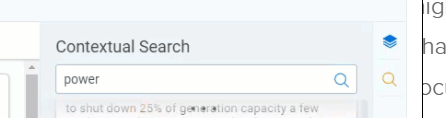


The occurrences of the terms will be highlighted in yellow in the document. When you select one of the multiple scrolling panes, with a use of the term in a context that interests you, that instance of the term will be highlighted in blue in the document.


One of the design features of RelativityOne is that it lists tabs on a side bar. Clicking on the three lines at the bottom of the side bar will show additional tabs in the 'More' menu that a user has been given access to.


Note that there are limitations as to which tabs will be displayed here. A tab shown here cannot be one associated with a higher level parent tab. Other tabs will have to be accessed on the horizontal tab strip. An admin can create new tabs. But if a parent field is selected in the Tab Location section, the 'Show in Sidebar' option will be disabled.


The order of a tab on the side bar can be designated, and an icon should be selected for each tab.


The sidebar will show more or less tabs based on the size of the web browser you are using. If the icon for a tab is not of a sufficient resolution, it will only be accessible in the 'More' menu.


Index entry XE codes in Word are field codes associated with particular string of text. The Tip of the Night for April 9, 2017, showed how XE codes can be used to automatically add multiple hyperIinks to a Word document. The Tip of the NIght for September 23, 2019 showed how to use a macro to remove XE codes added to a Word document.


You can also run a simple find and replace search to remove all of the XE codes added to Word document. Searching for:


^19 XE


. . . and replacing it with nothing, will erase any XE codes present in a Word document.


Be sure to have formatting symbols displayed, by pressing the ¶ icon on the Home ribbon.


Sean O'Shea has more than 20 years of experience in the litigation support field with major law firms in New York and San Francisco.   He is an ACEDS Certified eDiscovery Specialist and a Relativity Certified Administrator.

The views expressed in this blog are those of the owner and do not reflect the views or opinions of the owner’s employer.

If you have a question or comment about this blog, please make a submission using the form to the right. 

Your details were sent successfully!

© 2015 by Sean O'Shea . Proudly created with Wix.com

bottom of page