


Advancing in a video file by one second at a time
Anyone who has ever attempted to get to a precise position in a long video file in Windows Media Player, has likely become frustrated by the inability to go forward or backward in precise increments - whether by one second, five, ten, or more. You jump forward X number of seconds, then scroll back X seconds without landing at the exact point in the video you want to begin a playback or start an excerpt from.
VLC Media Player has a solution to this problem. You can fix the exact number of seconds that it will fast forward when either the left arrow or the right arrow is pressed in conjunction with the SHIFT, ALT, and CTRL keys.
In the Tools menu, select Preferences:

Select the 'All' radio button at the lower left in the 'Show settings' section. This will shift the available settings which are displayed, and you will see a drop down menu available on the left named, 'Interface'. Within this subsection, click 'Hotkeys settings'.

Then on the right, scroll down to show the options for very short, short, medium, and long jumps backwards and forwards.
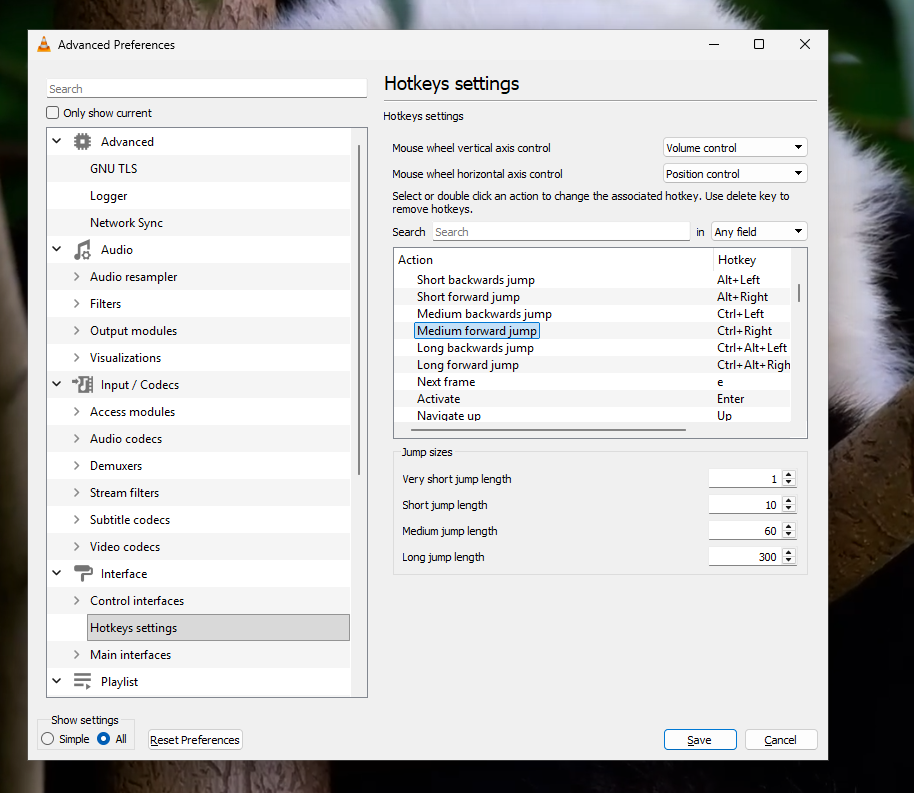
Here you can easily give yourself the ability to go back or forward in the video by different numbers of seconds when using hotkey settings with the left or right arrow keys.
