top of page

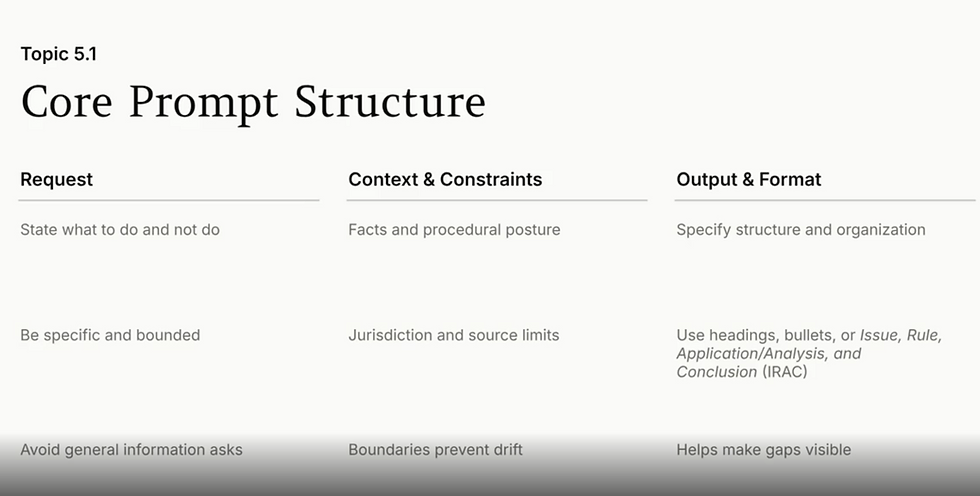
The key to getting AI systems like Harvey AI to generate effective drafts of legal briefs, and solve other problems is to devise a good prompt to get AI to give you the result that you need. In the AI for Legal Basics certification course, Harvey emphasizes that its system will not work well if given ambiguous instructions, and that projects should be divided into discrete tasks. A good prompt will indicate what should not be done, and the prompt should specify which authorities should guide it.


As a new addition to its extensive array of electronic discovery training materials, Relativity has prepared a guide, The Legal Professional’s Guide to Prompt Engineering, which can be downloaded here: https://resources.relativity.com/legal-professionals-guide-prompt-engineering-lp.html


The core idea is to alter the language often used in legal documents to phrasing that provides AI with better guidance about what to generate:


Here are some key takeaways:


  1. Having the ability to write well is key. Prompt engineers often have degrees in English, rather than in fields related to technology.


  1. Relativity references OpenAI's tips for engineering effective prompts which include:

    1. Use the latest LLM.

    2. Clearly distinguish between the instructions for what the AI system should do and the information it should be reviewing. OpenAI marks text to be analyzed with 3 quotation marks """:

    3. Be specific about the outcome. Give examples of the results that the system should generate. You want to avoid 'zero-shot prompting', which provides instructions without demonstrating the desired result.


  1. Much like the tried and true EDRM model, Relativity recommends thinking of prompt engineering as an iterative process. It's necessary to interact with the system to refine the result that it produces.

  2. AI can be instructed to indicate its own reasoning. CoT - chain-of-thought prompting is when a prompt tells the system to explain how it is reaching a conclusion. A prompt can, for example ask that the system identify an issue, the relevant rules, and state how the rule applies to the facts, showing how a conclusion is reached.

  3. Use role-based prompting: a prompt can specify that a system answer a question as someone working in a specific position would.

  4. Contextual prompting is when a prompt includes the text cited to for the facts of a case or the relevant law. The content of a contract or a statute is added to the prompt.

  5. AI systems are also guided by system prompts which users can't see that restrict the possible results. They may be prevented from giving answers with a political perspective.

  6. Relativity's aiR for Review is limited to 15,000 characters. Compare this to the much higher token / page limits in Harvey discussed in the March 20, 2026 Tip of the Night.

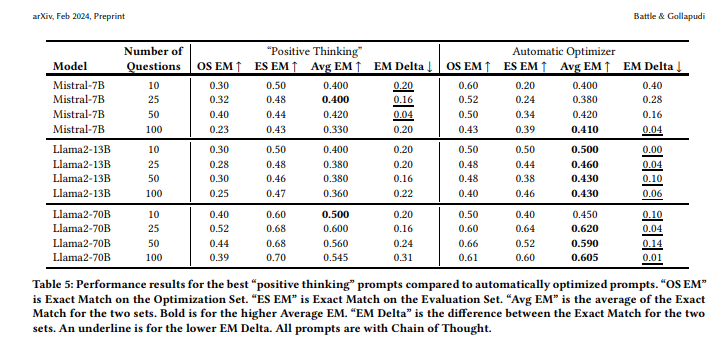
  7. Algorithms should be used to optimize prompts. They cite a research study conducted at VMware, Rick Battle and Teja Gollapudi, The Unreasonable Effectiveness of Eccentric Automatic Prompts, arXiv:2402.10949v2 (2024), which found that optimized prompts will give higher exact matches on average than prompts which merely encourage the system to arrive at a solution.


Relativity has its own prompt optimizer, or kickstarter.


It's possible to upload up to 10 documents (which can't have more than 300K characters), such as complaints, memoranda summarizing a case, or requests for production, to prime this function so that it can autogenerate criteria for a prompt.


  1. The active voice should be used in prompts, and double negatives should always be avoided.

  2. Boolean operators can be used in prompts, and even putting certain phrases in ALL CAPS or adding exclamation points can lead to a better result.

  3. AI systems may get confused by some legal terms which are too vague such as 'reasonable' or 'substantial'.

  4. There is currently some debate as to whether prompts should be regarded as work product, or if they ought to be disclosed in ESI protocols just as search terms are.


Relativity commissioned a study last year on how lawyers are using artificial intelligence. Here are some key points that I found interesting:


  1. While 38% of law firm study participants used AI software, significantly more — 50 % — of government employees did.

  2. AI software was most often used by legal teams for document review.

  3. Two-thirds of study participants have implemented training programs to help employees learn how to use AI.

  4. Paralegals actually use AI more often than lawyers.

  5. AI is more often used as a way to automate low-level tasks, and with the goal of cutting costs - two times more frequently than as a means to enhance risk compliance or legal analysis.

  6. There was more concern about the loss of confidential data, than there was about misleading AI hallucinations.

  7. IT professionals tend to be concerned about the loss of confidential data that is input into large language models (LLMs).

  8. Law firms were twice as likely to use in-house proprietary models or software provided by vendors as they were to rely on publicly available AI software.


BatchGuru from vdiscovery and Nikolai Pozdniakov's Hashtaglegal, is a set of tools to be used in a Relativity workspace which helps you easily transform metadata in existing fields.

If you need to remove email addresses from email metadata to, from, cc, or bcc fields for the purposes of generating output for a document index or privilege log, you can use the 'Remove Email Address' function which creates a new field with the addresses listed with domains deleted, and the email name aliases left in:


You can set it up simply by creating a batch and specifying source and destination fields:


BatchGuru also facilitates the export of native files. Create a new batch using 'Native Exporter' as the data source, and specify a metadata field to be used to designate the filenames:


. . . the output goes to another module in BatchGuru named, 'Native Exporter - Pick Up':


. . . which then links to a zip file containing the exported native files:


This function has limitations because the zip file which is generated is added to the workspace. Multiple exports of large numbers of native files can increase the size of the workspace considerably.


BatchGuru includes many other tools which will allow fields to be split by specified delimiters; generate 'autopreviews' of the first few lines of emails in document lists; and count the number of recipients listed in a single email message. Check out what's possible with it today!


Sean O'Shea has more than 20 years of experience in the litigation support field with major law firms in New York and San Francisco.   He is an ACEDS Certified eDiscovery Specialist and a Relativity Certified Administrator.

The views expressed in this blog are those of the owner and do not reflect the views or opinions of the owner’s employer.

If you have a question or comment about this blog, please make a submission using the form to the right. 

Your details were sent successfully!

© 2015 by Sean O'Shea . Proudly created with Wix.com

bottom of page